
- -50%
- New

Import products into PrestaShop from CSV and XLSX, with cron updates images

v1.1.0 · updated on 10/20/2026
Import products into PrestaShop from CSV and XLSX, with cron updates
Import and update your catalog from your supplier's or ERP file, CSV or XLSX, the way WP All Import works.
Rows that have not changed since the last run are skipped: on our test shop, 1,000 new products take 31 seconds and the next run with no changes, 1 second.
- PS 1.7
- PS 8
- PS 9
- Instant download after payment
- 3 months of support and 1 year of updates
- 30-day guarantee: if it does not work and we cannot fix it, we refund you

Developed and maintained by Kebes, a PrestaShop Expert level 3 agency with more than 15 years developing for PrestaShop.
VEO Product Import creates and updates PrestaShop products from CSV and XLSX files. Each import is saved with its file, its mapped columns and its options, and runs again by hand or by cron. It works on PrestaShop 1.7.7, 8 and 9.

Why another importer
We built it to replace the one we used on three shops with supplier price lists of 20,000 and 44,000 rows. It worked, but every update processed every row again, even when nothing had changed. We liked how WP All Import solves this in WordPress, and that is what we brought to PrestaShop: each row leaves a fingerprint, and if the row is the same on the next run, the product is not touched.
Columns to fields, with placeholders
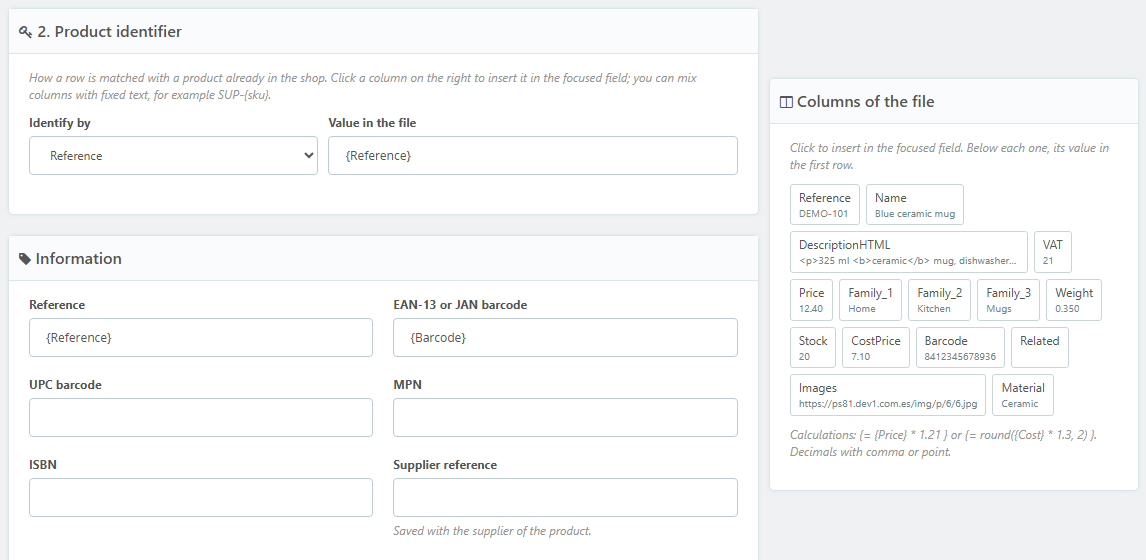
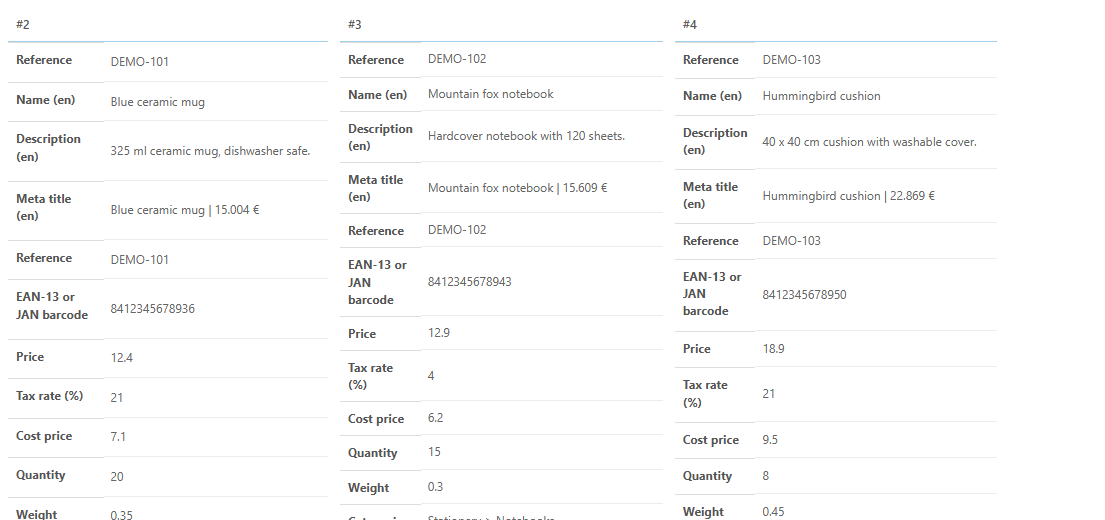
Upload the file (or give its URL) and the module detects the separator, the encoding and the columns. In each product field you write {Column}, by clicking the column in the panel on the right, and you can mix fixed text or do calculations: {= {Price} * 1.21 }. Text fields are mapped per language. The preview shows what the first rows would write before anything is imported.
Create, update, and what to do with what disappears
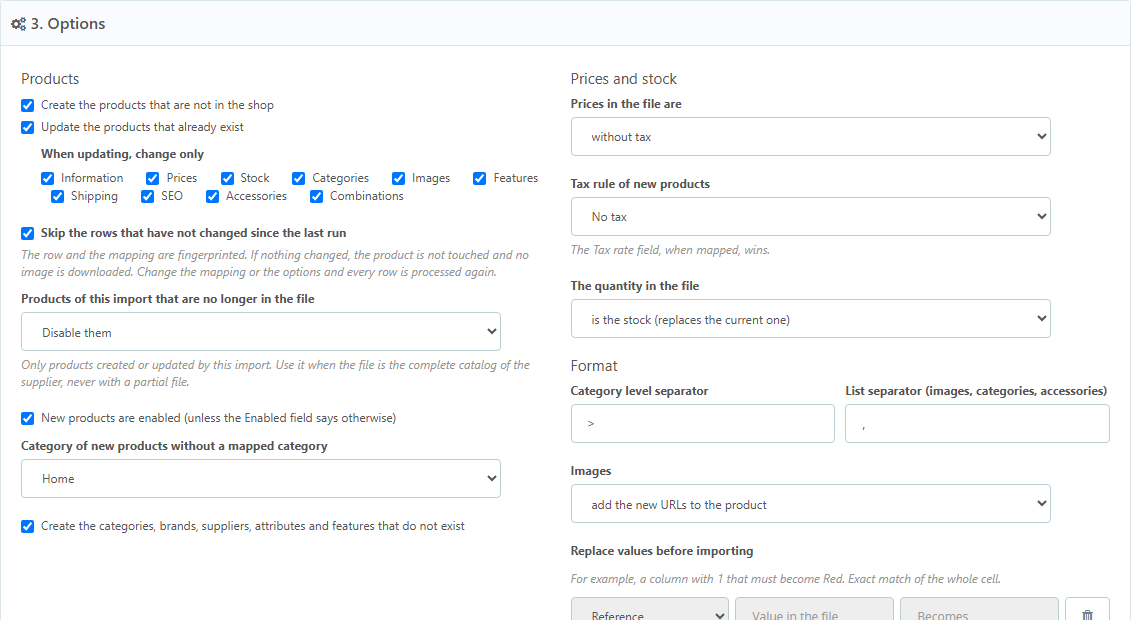
Products are identified by reference, barcode, MPN, ISBN, supplier reference, ID or name. You choose whether new ones are created, whether existing ones are updated and which groups of data are touched on update: information, prices, stock, categories, images, features, shipping, SEO, accessories or combinations. A mapped field that comes empty in the file leaves the data as it is; it never sets it to zero.
If the file is the supplier's complete catalog, products that are no longer in it can be disabled, set to zero stock or deleted. Only the ones that import created or updated.
What it understands in the file
- Categories by path (
Home > Kitchen > Mugs) or by level columns, creating the missing ones. The first one is the default category. - Tax by rate: a column with 21, 10 or 4 and the product gets that tax rule. Prices with or without tax.
- Stock that replaces, adds or deducts. Cost price, weight, dimensions, brand and supplier (created if missing).
- Images by URL. A URL already downloaded for a product is not downloaded again.
- Combinations, one row per combination: the parent product reference and columns for size, colour or anything else, with reference, barcode, stock, price and images of each combination.
- Features, accessories, catalog discounts and tags.
- Value replacements before importing: the column that says
1and should sayRed.
In batches and by cron
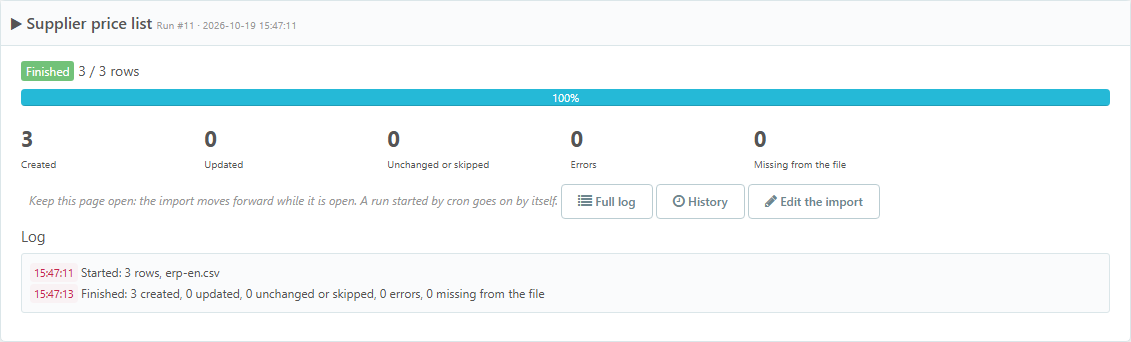
Measured on our test shop (PrestaShop 8.2, shared hosting): a 1,000-row CSV with name, price, tax, categories and stock creates the 1,000 products in 31 seconds; the same import run again with no changes finishes in 1 second. With images it depends on how long they take to download.
From the back office the import moves forward in batches with a progress bar, counters and a live log; it can be stopped. With the file on a URL, each import has its own cron address: every call downloads the file, works for the seconds you set and the next call carries on where it left off. The history keeps every run with its figures and its log.
What it does not do
It does not read XML and does not connect by FTP or SFTP: the file is uploaded or downloaded from an http URL. It does not import customers or orders. XLSX files need the PHP zip extension, which almost every host has.
Compatibility
PrestaShop 1.7.7 to 9.2. Tested on 1.7.8.11 with the Classic theme, on 8.2.7 and on 9.2.0 with Hummingbird. No overrides.
Installation
- Upload the ZIP from Modules > Module Manager.
- In Catalog > Product import, create an import, upload the file and click "Read the file".
- Map the columns, check the options and use the preview.
- Save and run. To schedule it, copy the cron URL of the import.
License
License for one installation, with one year of updates and support. You can modify the module for your shop or your client's; it cannot be redistributed or resold.
Frequently asked questions
What happens if I change the mapping or the options?
The fingerprint of each row includes the mapping and the options that affect what is written. Change them and every row is processed again on the next run. Changing the batch size or what to do with missing products does not force a reprocess.
Can I have a full import and another one just for prices and stock?
Yes, and it is the recommended setup. One import with every field to load the catalog, and another that only maps the reference, the price and the quantity for the daily update.
What about an empty price in the file?
Nothing: the product keeps the one it had. To set a price to zero, write 0 in the file.
Are combinations created on their own?
Yes. If the file has one row per combination with the parent product reference and the attribute columns, the product, the attributes and their values are created if missing, and each combination with its stock, price and images.
Changelog
1.1.0 – 2026-10-20
- The cron URL is now the module one (`.../module/veoproductimport/cron?id=…&token=…`). Copy the new one from the import and update your scheduled task: the old `modules/veoproductimport/cron.php` no longer answers on the web. From the command line it stays the same (`php cron.php1.0.0 – 2026-10-19
- Saved imports from CSV and XLSX, uploaded or downloaded from a URL.
- Column mapping with placeholders and calculations, fields per language and preview.
- Products created and updated by reference, barcode, MPN, ISBN, supplier reference, ID or name, choosing which data is updated.
- Rows that have not changed since the last run are skipped.
- Categories by path, brands, suppliers, features, attributes, tax by rate, images by URL, accessories, discounts and tags.
- Combinations, one row per combination.
- Products missing from the file: disable, zero stock or delete.
- Batches from the back office and a cron URL per import, with history and log.
Compatibility
| PrestaShop | Module version | Status |
|---|---|---|
| 1.7.7 – 9.2 | 1.1.0 | Compatible |
| 1.7.6 and older | — | Not compatible |
Data sheet
- Versión
- 1.1.0
- Languages
- English, Spanish
- Support languages
- English, Spanish
Will it work in your shop? Ask us before buying
If you need a specific feature, or your PrestaShop version is not listed as tested, tell us. It often works all the same. And if you ask for a feature that improves the module and can help more shops, we add it in a next version at no cost to you. The person who wrote the module answers you.
Support and licence
Help with installation, configuration and errors of the module, by ticket from My modules, in Spanish.
New versions and adaptations to PrestaShop from your account. Afterwards the module keeps working.
Standard: one shop in production plus its test copies. Agency: unlimited shops of your clients.