
- New

Fast PrestaShop image slider with mobile images images

v1.0.1 · updated on 11/08/2026
Validated with the official PrestaShop validator
Fast PrestaShop image slider with mobile images
A free PrestaShop image slider for the home page banner: image, title, text and a button on every slide, plus a separate image for mobile when you need one.
The first image is requested with high priority, the slider's space is reserved from the start, and nothing is loaded on pages where it is not shown. It replaces ps_imageslider and imports its slides.
- PS 1.7
- PS 8
- PS 9
- Instant download from My modules
- Updates from your account

Developed and maintained by Kebes, a PrestaShop Expert level 3 agency with more than 15 years developing for PrestaShop.
VEO Slider is a PrestaShop image slider for the large banner at the top of your home page, which is usually the heaviest image in the shop. You add slides with an image, texts and a button, pick a different image for phones when the desktop one is unreadable on a narrow screen, and the module makes sure the first image shows up as soon as possible. It is free and runs on PrestaShop 1.7.8, 8 and 9.
Why we built it
The slider that ships with PrestaShop (ps_imageslider) has no mobile image and no button text, and in the Classic theme the first image has loading="lazy", so the browser fetches the most visible image on the page last. We went through the code of the sliders we come across most in PrestaShop shops: none of them gives the first image priority, and all of them load their JavaScript on every page, including pages with no slider at all.
On a home page that shows up in LCP, the metric Google uses for how long it takes to see the main content. So we went the other way: a short list of options that people actually use, and speed that does not depend on getting the settings right.
How it loads
- The first image gets
fetchpriority="high"and apreloadin the page head, so the browser asks for it before reading the rest of the page. If the slide has a mobile image, phones preload that one and desktops the desktop one, never both. - The other slides use
loading="lazy"and do not compete with the first one, which the browser requests first. - The space is reserved with the real width and height of the image, which the module reads on upload (separately for desktop and mobile). The page does not jump when the slider appears.
- When the slider is on the home page, its CSS and JavaScript load only there. That is about 6 KB of its own JavaScript and 5 KB of CSS, with no jQuery and no third-party libraries.
- Sliding uses the browser's native scrolling (
scroll-snap), so the swipe on a phone feels like the browser's own.
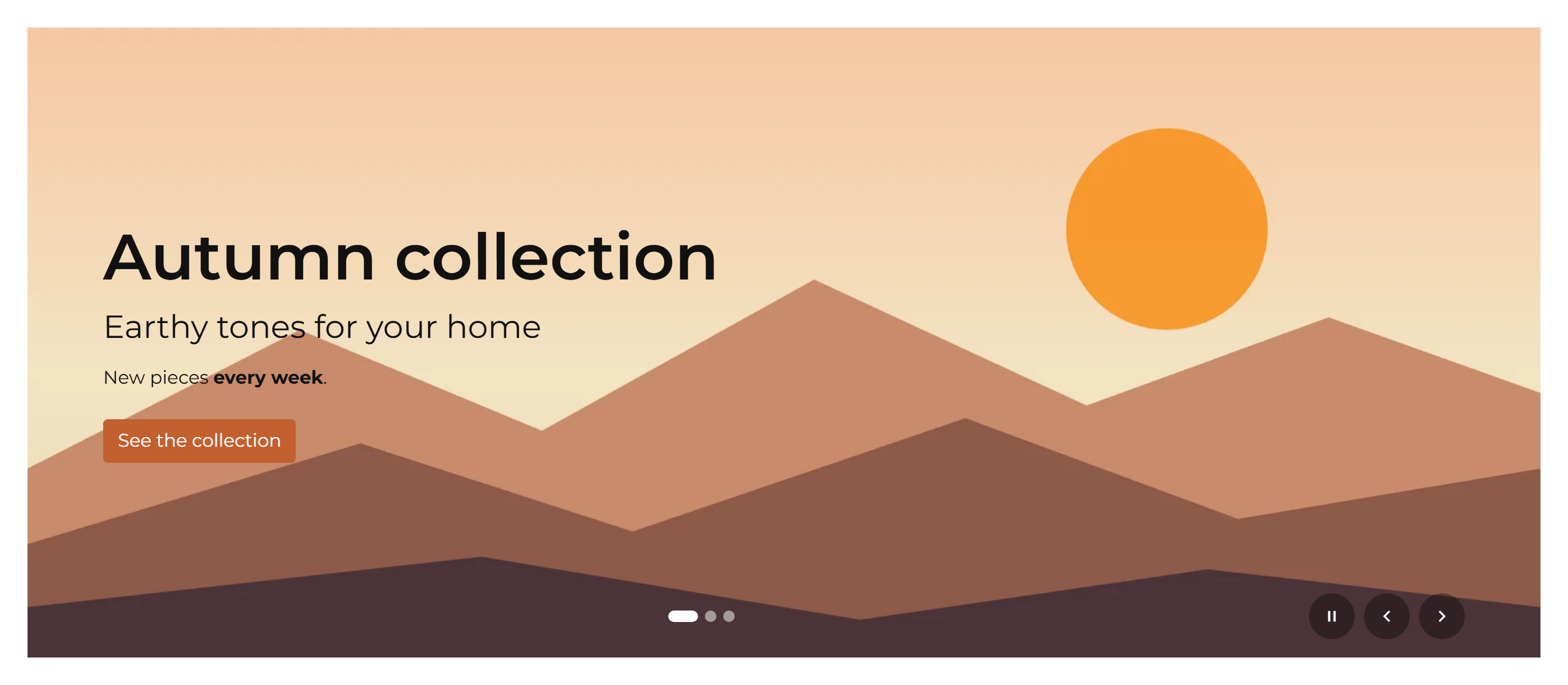

What goes on each slide
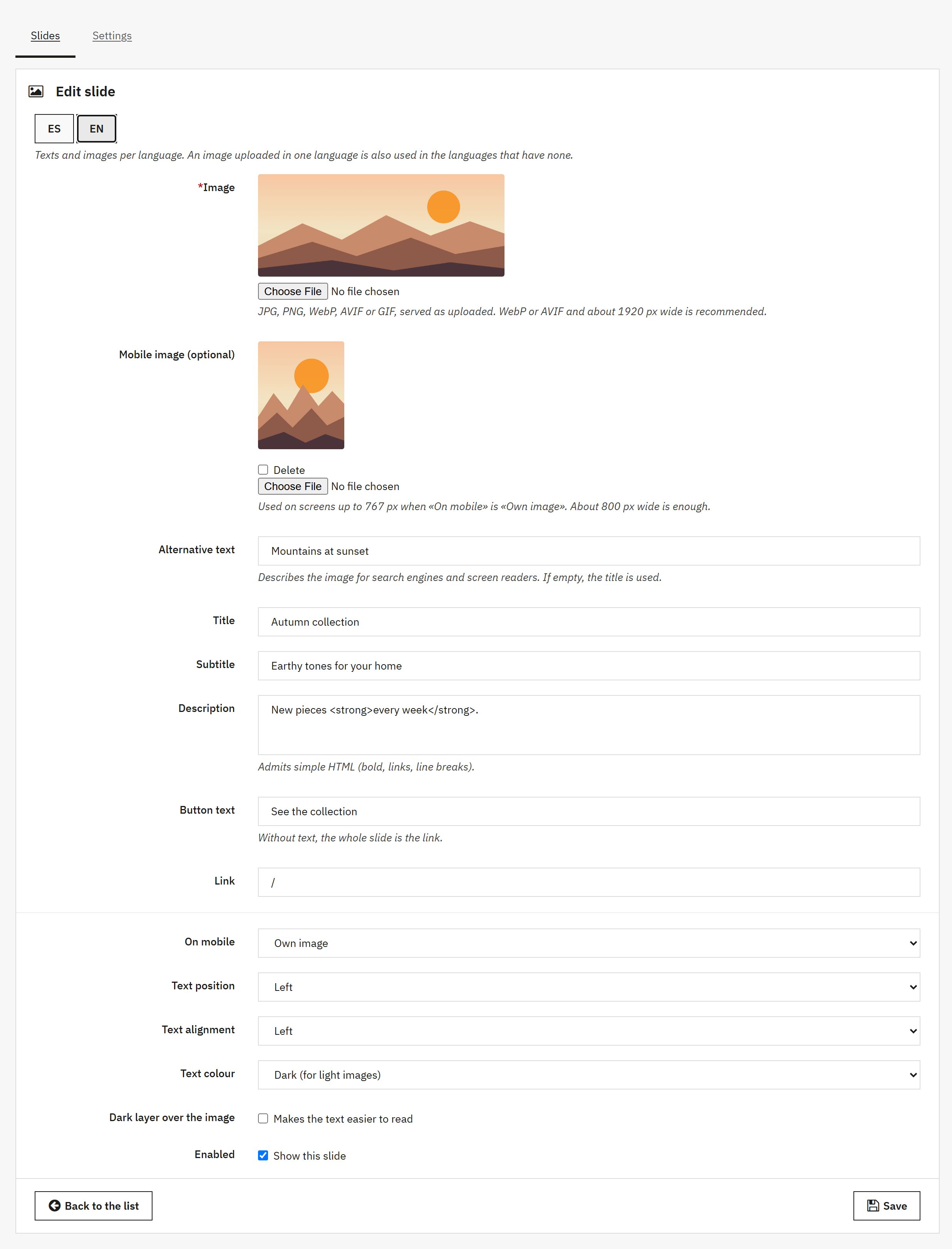
- An image in JPG, PNG, WebP, AVIF or GIF, served exactly as uploaded, never converted.
- An optional mobile image. For each slide you choose what happens on screens up to 767 px wide: use the desktop image, use its own image or hide the slide (its navigation dot goes too).
- Alt text, title, subtitle, description (bold, links and line breaks allowed), button text and link. With no button text, the whole slide is the link.
- Text position (left, centre or right), alignment, light or dark text and a dark layer over the image to make the text easier to read.
- Everything per language. An image uploaded in one language is also used in languages that have none, so a shop in five languages does not need five uploads.
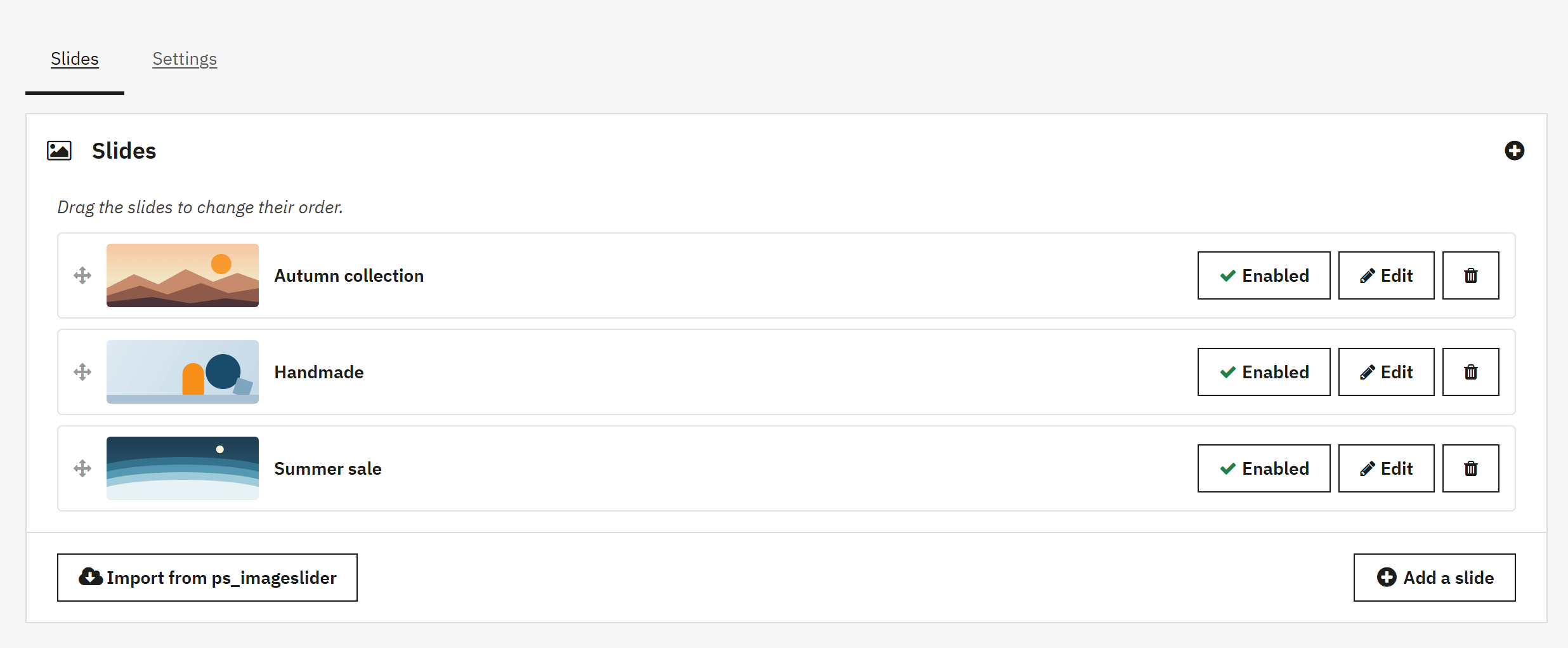
Slides are reordered by drag and drop and switched on or off one by one.
Upload warnings
The module does not resize or convert your images, but it warns you on upload if the longest side is over 2560 px, the file is over 500 KB, or it is not WebP or AVIF. It suggests around 1920 px wide for desktop; around 800 px is enough for mobile.
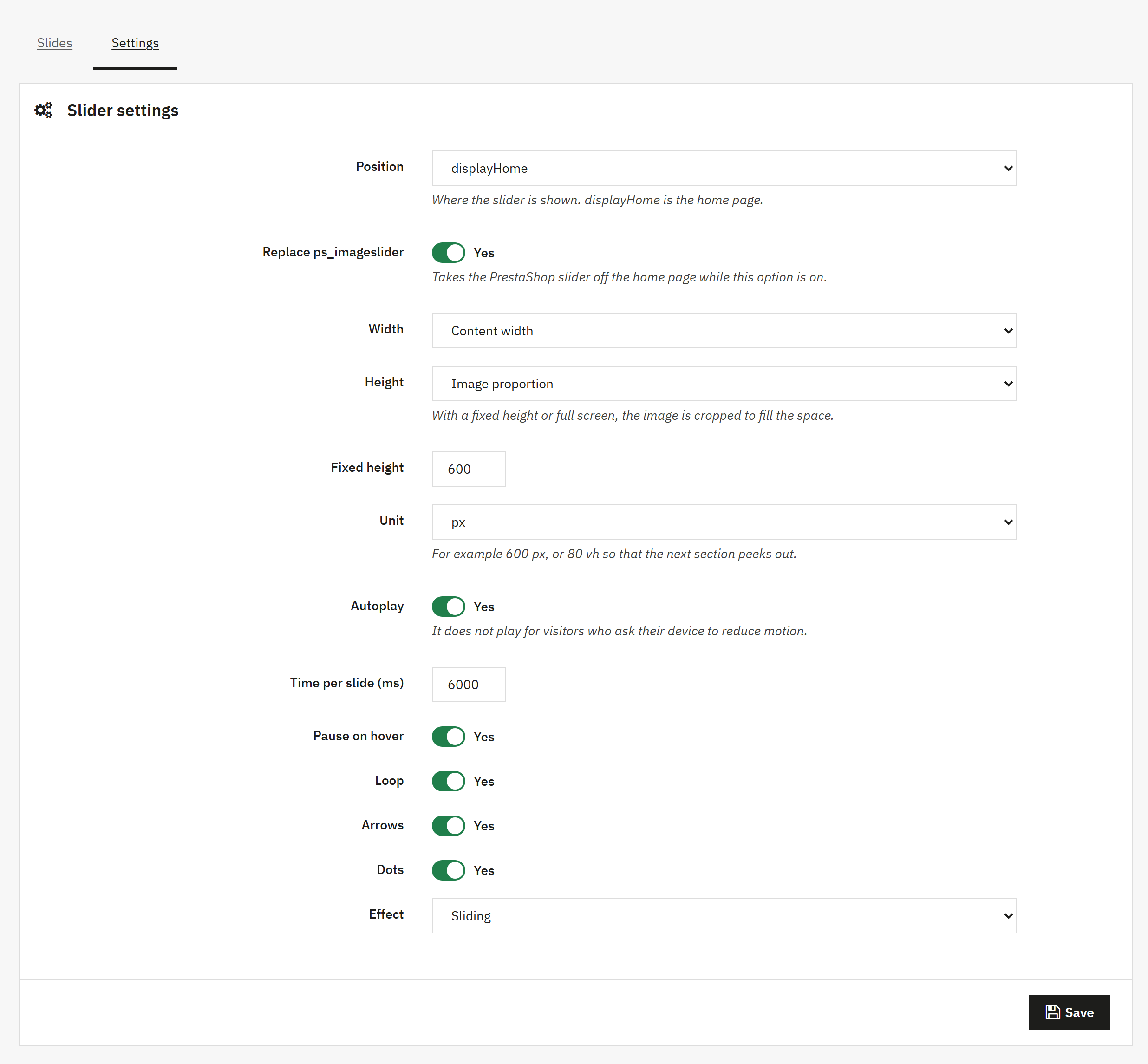
Slider settings
- Where it is shown: the home page (
displayHome) by default, or any other front office hook from the list. - Content width or edge to edge.
- Height from the image proportion, fixed (in px or vh, such as 80 vh so the next section peeks out) or full screen. With a fixed height or full screen the image is cropped to fill the space.
- Autoplay, time per slide, pause on hover, loop, arrows, dots, and slide or fade effect.
Accessibility
When it plays on its own, the slider has a pause button. It works with the keyboard arrow keys, arrows and dots are labelled for screen readers, and each slide announces its place («2 / 4»). Visitors who turn on «reduce motion» on their device get no autoplay, and it does not advance while the tab is in the background.
Moving over from ps_imageslider
The «Slides» tab has an «Import from ps_imageslider» button that copies its slides with images, texts, links, order and languages. ps_imageslider itself is left untouched. Turn on «Replace ps_imageslider» in the settings and the PrestaShop module stops showing on the home page while VEO Slider takes its place; turn the option off or uninstall VEO Slider and ps_imageslider comes back where it was.
What it does not do
It is an image slider, not an animated layer editor: no per-element animations, video or 3D effects, and it is not meant for product carousels. The free version has one slider per shop. A Pro edition will follow later.
Compatibility
Compatible with PrestaShop 1.7.8, 8 and 9 (up to 9.2): tested on PrestaShop 1.7.8.11, 8.2.7, 9.1.4 and 9.2.0, with PHP 7.4 to 8.5. It works with any theme because it brings its own template, CSS and JavaScript; the button uses the btn btn-primary class, so it picks up your theme's button style. On multistore, each shop has its own slides and settings.
Installation
Upload the ZIP from Modules > Module Manager and click «Configure». In the «Slides» tab you create the slides (or import them from ps_imageslider), and in «Settings» you choose where and how the slider is shown. Images are stored in img/veoslider/, outside the module folder, so they survive updates. Every option is covered in the PDF manual.
If you are working on your home page, you may also like the free PrestaShop mega menu, with one menu for desktop and mobile, or, on PrestaShop 9, the block editor to lay out the rest of the home page.
Frequently asked questions
Can it replace the PrestaShop slider (ps_imageslider)?
Yes. It imports its slides with one button and, with «Replace ps_imageslider», takes it off the home page while the option is on. Nothing in ps_imageslider is deleted: turn the option off or uninstall VEO Slider and it is back.
Can I use a different image on mobile?
Yes, on every slide, and it is optional. Screens up to 767 px wide get the mobile image, and the phone downloads only that one, not both. You can also keep the desktop image or hide that slide on mobile.
Which image format should I use, and how much does it affect speed?
WebP or AVIF, around 1920 px wide for desktop and 800 px for mobile. The module serves the image exactly as uploaded, so its file size is what counts: upload a 3 MB JPG and visitors download 3 MB, which is why it warns you. What the module does take care of is requesting that first image with priority, reserving its space and holding the others back.
Can I have several sliders, for example one per category?
Not in the free version: there is one slider per shop, in the hook you choose. If you put it in a hook other than the home page, bear in mind its CSS and JavaScript then load on every page.
Do I lose my slides when I update the module?
No. Slides are in the database and images in img/veoslider/, which an update does not touch. They are deleted when you uninstall it, and PrestaShop asks you first.
Changelog
1.0.1 – 2026-11-08
- Notice on the configuration page when a new version is available on veomod.com (checked once a day without sending any shop data; if veomod does not respond, the module works the same) and links to other Veo modules.
1.0.0 – 2026-11-07
New: module release.
- Image slider with title, subtitle, description, button and link in every language.
- Optional mobile image and, per slide, use the desktop image, its own or hide it.
- First image loaded with priority and preloaded, the rest with
loading="lazy", and the space reserved so the page does not jump. - Its own CSS and JavaScript, no jQuery, loaded only where the slider is shown.
- Basic design per slide, configurable width and height, slide or fade effect.
- Pause button, keyboard control and no autoplay for visitors who ask for reduced motion.
- Import from ps_imageslider and an option to replace it on the home page.
Compatibility
| PrestaShop | Module version | Status |
|---|---|---|
| 1.7.8 – 9.2 | 1.0.1 | Tested on 11/08/2026 |
| 1.7.7 and older | — | Not compatible |
| PHP | 7.4 – 8.5 | Compatible |
Data sheet
- Versión
- 1.0.1
- Languages
- English, Spanish
- Support languages
- English, Spanish
Will it work in your shop? Ask us before buying
If you need a specific feature, or your PrestaShop version is not listed as tested, tell us. It often works all the same. And if you ask for a feature that improves the module and can help more shops, we add it in a next version at no cost to you. The person who wrote the module answers you.