
- New

Google Ads tag for PrestaShop with your AW- ID images

v1.0.3 · updated on 10/20/2026
Validated with the official PrestaShop validator
Google Ads tag for PrestaShop with your AW- ID
Paste your Google Ads ID (AW-) and the Google tag loads on every page of the shop.
A Google Analytics 4 ID (G-) also works. Free.
- PS 1.7
- PS 8
- PS 9
- Instant download from My modules
- Updates from your account

Developed and maintained by Kebes, a PrestaShop Expert level 3 agency with more than 15 years developing for PrestaShop.
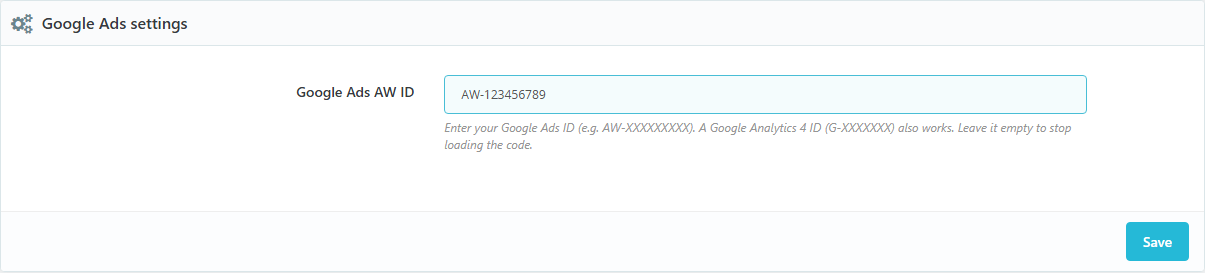
VEO Simple Google Ads adds the Google Ads tag to PrestaShop (gtag.js) without touching the theme: paste your ID and it loads in the <head> of every page. It works on PrestaShop 1.7.7, 8 and 9.
What it does
- Loads
gtag.jswith your Google Ads ID (AW-123456789) or Google Analytics 4 ID (G-XXXXXXX). - Checks the ID before saving it. If you leave it empty, nothing is loaded.
- With VEO Simple GTM the purchase conversion is also sent on the confirmation page, with the order value, currency and reference.
What it does not do
It does not handle cookie consent. Use it with your cookie banner: VEO GDPR Cookie Compliance holds the tag until the visitor accepts advertising cookies.
What is new in 1.0.2
Earlier versions were installed with the sample ID AW-XXXXXXXXX already saved, so they loaded the tag with an ID that does not exist until someone entered theirs. Now it is installed empty and, on update, that sample ID is removed.
Compatibility
PrestaShop 1.7.7 to 9.2. Tested on 1.7.8.11, 8.2.7 and 9.2.0. No overrides.
Installation
Upload the ZIP from Modules > Module Manager, click "Configure" and paste your ID.
Frequently asked questions
Where do I find my Google Ads ID?
In your Google Ads account, in the Google tag settings: it is the code that starts with AW-.
Can I use it just for Google Analytics 4?
Yes. Paste the ID that starts with G- and the Google tag loads with it.
I already use Google Tag Manager. Do I need it?
If your container already has the Google Ads tag, no. You only need it if you want VEO Simple GTM to send the purchase conversion without creating it inside Tag Manager.
Changelog
1.0.3 – 2026-10-20
- Code reviewed with the official PrestaShop validator (formatting, headers and good practices). No change in how it works.
1.0.2 – 2026-10-18
- The sample ID AW-XXXXXXXXX is no longer saved on install (it loaded the tag with an ID that does not exist); on update it is removed if still there.
- The ID is checked: AW- for Google Ads or G- for Google Analytics 4. Empty, nothing is loaded.
Compatibility
| PrestaShop | Module version | Status |
|---|---|---|
| 1.7.7 – 9.2 | 1.0.3 | Compatible |
| 1.7.6 and older | — | Not compatible |
Data sheet
- Versión
- 1.0.3
- Languages
- English, Spanish
- Support languages
- English, Spanish
Will it work in your shop? Ask us before buying
If you need a specific feature, or your PrestaShop version is not listed as tested, tell us. It often works all the same. And if you ask for a feature that improves the module and can help more shops, we add it in a next version at no cost to you. The person who wrote the module answers you.