
- New

PrestaShop FAQ module for product and category pages images

v1.3.2 · updated on 11/08/2026
Validated with the official PrestaShop validator
PrestaShop FAQ module for product and category pages
Free PrestaShop FAQ module that shows questions and answers at the bottom of the product and category pages you pick.
Each question is written in every shop language, opens as a collapsible item and comes with FAQPage structured data. You can load them in bulk from a JSON file.
- PS 1.7
- PS 8
- PS 9
- Instant download from My modules
- Updates from your account

Developed and maintained by Kebes, a PrestaShop Expert level 3 agency with more than 15 years developing for PrestaShop.
This PrestaShop FAQ module puts the answers where the doubt comes up: on the product page or on the category the customer is browsing. It is free and tested from PrestaShop 1.7.8 to 9.2.
The problem: answers live far from the product
PrestaShop has no per-product FAQs. Shops end up with a general FAQ page few people open, or they cram the answers into the product description, between sizes and materials. Either way the customer emails you, or leaves.
How it solves it
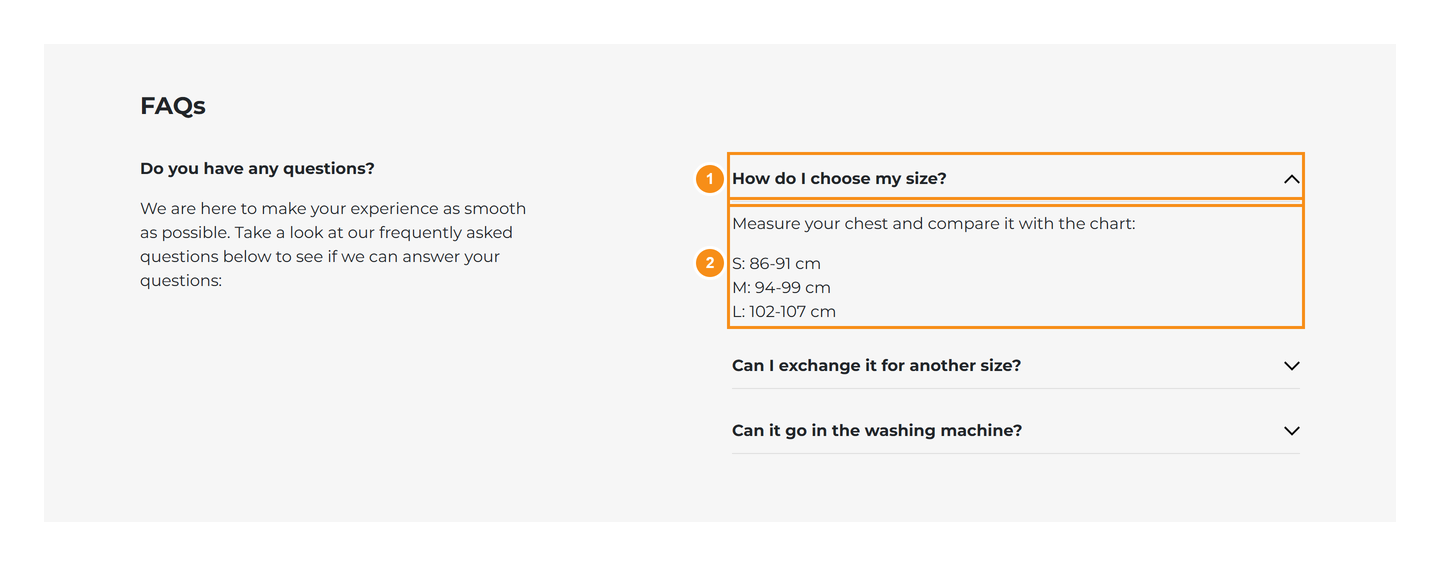
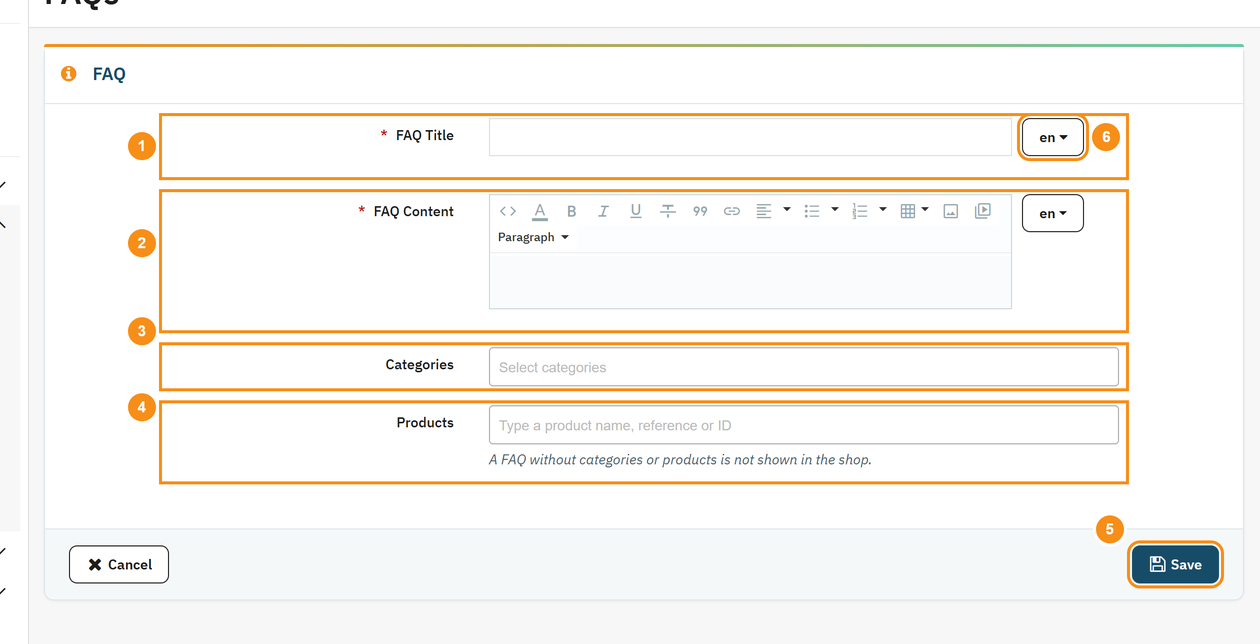
You write each question once and choose the categories and products where it shows. The block sits at the bottom of the page with the questions collapsed, one click away from the answer. A shipping-times question can cover the whole catalog; a care-instructions one, just three products.
Features
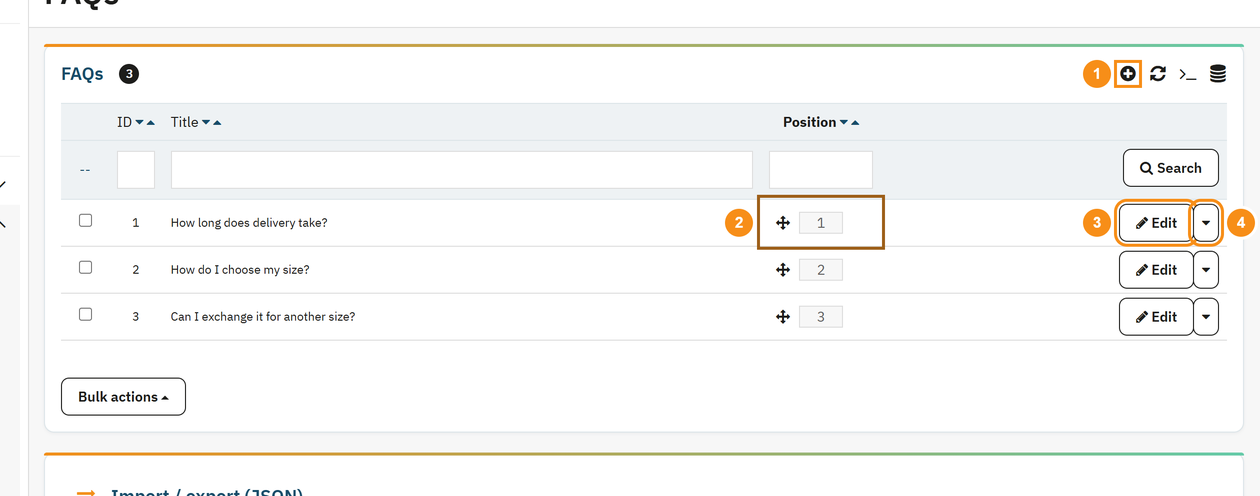
- FAQs on product pages and category pages, assigned to each one by hand.
- One version per language: each shop language shows its own question and answer. Leave a language blank and the question is hidden there.
- Answers written with the back office text editor: bold, lists and links.
- FAQPage structured data in JSON-LD for the questions on each page.
- Drag and drop ordering in the list.
- Product search by name, reference or ID as you type, so the form stays fast on catalogs with thousands of products.
- Its own menu entry: Catalog › FAQs.
- Native HTML collapsibles, no JavaScript on the storefront, keyboard friendly, and no animation when the visitor asks for reduced motion.
- The CSS only loads on pages that have FAQs.
Lots of questions at once: JSON import and export
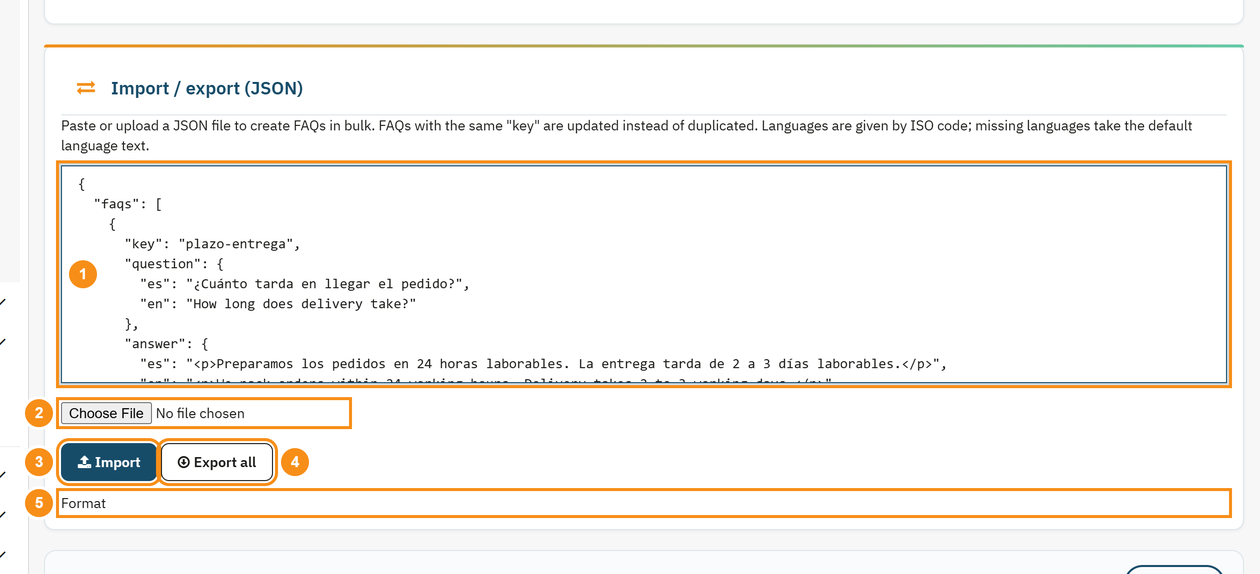
If your questions sit in a spreadsheet or an AI tool drafts them for you, there is no need to add them one by one. Paste or upload a JSON file with the texts per language and the categories and products (by ID or reference). Every question has a key, so importing the same file again updates the existing ones instead of creating duplicates. "Export all" downloads the same format and doubles as a backup.
Compatibility
Tested on PrestaShop 1.7.8, 8.2, 9.1 and 9.2, with PHP 7.4 to 8.5. No overrides, no core changes. The block is rendered on the standard displayFooterProduct and displayFooterCategory hooks.
Installation
Upload the ZIP from Modules > Module Manager and go to Catalog › FAQs to create your first question. Assigning, ordering and importing are covered in the PDF manual.
For structured data on the rest of the shop (product, organization, breadcrumbs), see VEO Schema. To add a tab with your own content to the product page, see VEO Extra Tabs.
Frequently asked questions
Will my FAQs show up in Google results?
Most likely not as an expandable result. Since August 2023 Google only shows that rich result for well-known government and health websites. The FAQPage markup is still valid, and the questions are visible text on the page that Google indexes like any other content.
If I assign a question to a category, does it show on that category's products too?
No. It shows on the category page. To show it on a product, add that product to the question, by hand or through the JSON import.
Will it work with my theme?
It works with themes that render the displayFooterProduct and displayFooterCategory hooks, which are PrestaShop's standard ones. If your theme leaves them out, the block does not appear.
Does it slow the shop down?
It loads no JavaScript on the storefront, and its CSS is only added to the product and category pages that have FAQs. Every other page stays untouched.
Does it support multistore?
The questions are shared by every shop in the installation. They cannot be split per shop.
What happens if I uninstall it?
The questions are deleted. Before uninstalling, download a copy with "Export all": after reinstalling, import it and they come back with their categories and products.
Changelog
1.3.2 – 2026-11-08
- Notice on the configuration page when a new version is available on veomod.com (checked once a day without sending any shop data; if veomod does not respond, the module works the same) and links to other Veo modules.
1.3.1 – 2026-11-06
New: FAQs have their own menu entry under Catalog › FAQs.
Improved: the product picker in the form searches by name, reference or ID as you type instead of loading the whole catalog, so the form opens fast even with thousands of products.
Improved: the FAQ CSS only loads on product and category pages that have questions, and the block fits the theme's content width with no horizontal scrolling on desktop.
Improved: questions can be browsed with the keyboard with a visible focus, and the opening animation is turned off when the visitor asks for reduced motion.
Fixed: drag and drop ordering in the list now saves the new order.
Fixed: categories and products are no longer flagged as required in the form, and their search box texts are translated.
Fixed: the list numbers questions from 1, and exporting and importing again no longer duplicates questions created in the form.
Important: importing FAQs requires add, edit and delete permissions, saving one requires add or edit permission, and an .htaccess file blocks direct access to the module's PHP files.
1.3.0 – 2026-10-18
New: JSON import and export of FAQs, with texts per language, categories and products (by ID or reference). Each question has a key, so importing again updates instead of duplicating.
1.2.0 – 2026-10-18
New: questions and answers in several languages: each shop language shows its own. On update, existing FAQs are copied to every language.
Fixed: the FAQPage structured data is valid JSON even when answers contain quotes or line breaks.
Fixed: the select2 library only loads on the FAQ screen, not across the whole back office.
1.1.1 – 2026-10-17
Improved: compatible with PrestaShop 9.
Improved: full Spanish translation, including the FAQ block on the storefront.
Compatibility
| PrestaShop | Module version | Status |
|---|---|---|
| 1.7.8 – 9.2 | 1.3.2 | Tested on 11/08/2026 |
| 1.7.7 and older | — | Not compatible |
| PHP | 7.4 – 8.5 | Compatible |
Data sheet
- Versión
- 1.3.2
- Languages
- English, Spanish
- Support languages
- English, Spanish
Will it work in your shop? Ask us before buying
If you need a specific feature, or your PrestaShop version is not listed as tested, tell us. It often works all the same. And if you ask for a feature that improves the module and can help more shops, we add it in a next version at no cost to you. The person who wrote the module answers you.